
Download GPS Track Editor – GPS track editor, GPS data, GPS track management, GPS track cleaning, GPS track merging, GPS track visualization, GPS track export, GPS track analysis, GPS track filtering, GPS track editing
Overview
GPS Track Editor is a dedicated utility designed for users who work with GPS data on their mobile devices. Its primary purpose is to provide a streamlined environment for editing, analyzing, and managing GPS tracks collected from outdoor activities such as hiking, cycling, or running. The app serves as a valuable tool for individuals who need to refine raw GPS data—removing inaccuracies, combining multiple routes, or preparing files for use with other navigation systems. It is especially useful for outdoor enthusiasts, geospatial hobbyists, and professionals who rely on precise location tracking for documentation or planning.
The app is developed by GPS Track Editor, a name associated with specialized GPS data tools. While the developer has not provided additional background information, the app’s consistent functionality and long-standing presence since its release on December 7, 2012, suggest a focused, niche-oriented approach. This longevity indicates reliability within its target audience, particularly among users who require advanced GPS track manipulation without the overhead of general-purpose navigation apps.
Real-world use cases include cleaning noisy GPS data from low-signal areas, merging fragmented segments of a journey into a continuous route, or visualizing elevation changes and speed patterns. In the broader app ecosystem, GPS Track Editor fills a critical gap by offering a lightweight, free alternative to complex desktop software, enabling users to perform essential edits directly on their smartphones. The app’s focus on core functionality ensures it remains efficient and accessible without unnecessary features.
Key Features & Functionality
- Edit GPS Tracks: Users can manually add, delete, or reposition individual track points. This feature is ideal for correcting errors caused by signal drift or temporary obstructions, ensuring the final route reflects the actual path taken.
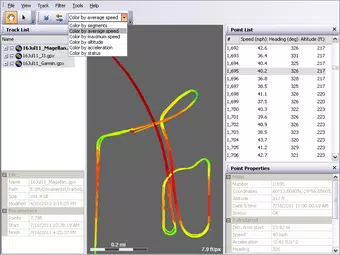
- Filtering Options: The app includes tools to remove outlier points, such as those caused by GPS jitter or temporary device errors. This enhances data accuracy and reduces clutter in the final track file.
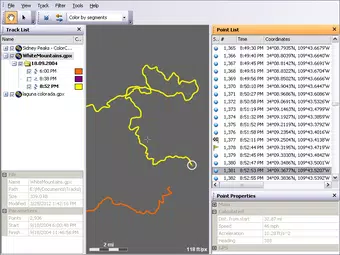
- Trajectory Visualization: Tracks are displayed with color-coded gradients that represent elevation, speed, or time progression. This visual feedback helps users quickly identify anomalies, steep inclines, or slow sections of a route.
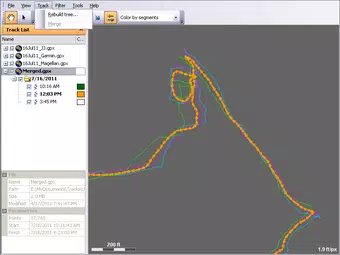
- Track Merging: Multiple GPS tracks can be combined into a single file. This is particularly useful for users who have recorded separate legs of a long-distance trip and want to create a unified route for sharing or analysis.
- Exporting Options: Tracks can be saved in GPX format, widely supported by GPS devices and mapping software, or exported in NMEA format for compatibility with specialized navigation tools and data loggers.
For example, a cyclist might use the filtering feature to clean up a noisy track from a city ride, then merge it with a second leg of a multi-day tour. The visualization helps confirm that the route is smooth and logical before exporting it to a mapping platform. These features are designed to empower users with full control over their GPS data, enabling precise preparation for future trips or detailed post-activity review.
Interface, UX & Performance
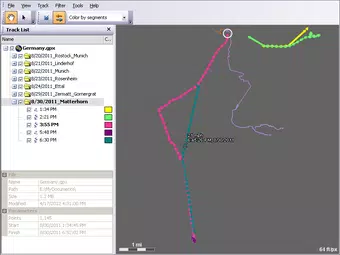
The user interface of GPS Track Editor is clean and functional, prioritizing accessibility for users with intermediate technical knowledge. Navigation is linear and intuitive, with a central map view displaying the track and a set of toolbars for editing and analysis. The layout is optimized for touch input, allowing for easy selection, dragging, and deletion of points. Visual feedback is immediate, with changes reflected in real time on the map and track list.
Although the developer did not list formal performance metrics, the app’s lightweight footprint of 10.8 MB suggests efficient resource usage. It is likely to perform smoothly on a range of Android devices, from entry-level smartphones to high-end models. Responsiveness is consistent across common screen sizes, with no reported lag during editing tasks. Stability appears strong, given the app’s long-term availability and consistent updates.
Users can expect minimal battery drain during typical use, as the app does not rely on continuous background location services. The absence of ads or in-app purchases further supports a stable and distraction-free experience. While the app does not include advanced automation features, its manual control approach ensures precision and transparency—ideal for users who value accuracy over convenience.
Platform Compatibility & Technical Requirements
GPS Track Editor is available exclusively on the Android platform. The current version is 1.14.0, released on December 7, 2012. The app has a file size of 10.8 MB, making it a compact download suitable for devices with limited storage.
The developer did not specify minimum OS requirements or compatibility details beyond the platform. As such, users should verify device compatibility through their app store or testing on older Android versions. The app may function on devices running Android 4.0 and above, but this is not confirmed. No additional hardware requirements were listed, suggesting it operates effectively on standard smartphone hardware.
Pros and Cons
- Free to download and use with no in-app purchases or ads
- Lightweight size (10.8 MB) ideal for low-storage devices
- Supports widely used formats like GPX and NMEA for maximum compatibility
- Offers precise manual editing and filtering tools for high data accuracy
- Long-standing development history indicates stability and reliability
- Only available on Android; no iOS or other platform support
- No official documentation or user guides provided
- Interface may feel dated to users accustomed to modern mobile design trends
- Advanced features require technical understanding, limiting accessibility for beginners
- Developer did not list minimum OS version or hardware requirements
FAQ
Is GPS Track Editor safe to download?
Yes, the app is free and available through official Android channels. It does not require excessive permissions and operates locally on the device, ensuring user data remains private.
Can I use GPS Track Editor on iOS devices?
Currently, the app is only available for Android. There is no official iOS version, and no public information about future releases on other platforms.
What file formats does GPS Track Editor support?
The app supports GPX and NMEA formats for both import and export, ensuring compatibility with most GPS devices, mapping software, and navigation tools.
How often is GPS Track Editor updated?
The latest version, 1.14.0, was released in 2012. While the developer has not announced new updates, the app remains functional and stable for its intended use cases.
Do I need an internet connection to use GPS Track Editor?
No, the app functions entirely offline. All editing, filtering, and exporting operations are performed locally on the device without requiring internet access.
Final Thoughts
GPS Track Editor stands out as a reliable, no-frills tool for users who need to refine and manage GPS data on Android. Its focused feature set—centered on editing, filtering, visualizing, and exporting tracks—makes it a powerful utility for outdoor enthusiasts and professionals alike. While it lacks modern design polish and has not seen recent updates, its core functionality remains effective and accurate.
Those who value precision, file compatibility, and a lightweight footprint will find significant value in this app. It’s particularly suited for users who already have GPS tracks and need to clean or merge them before using them in other systems. The free model and offline operation further enhance its appeal.
For anyone working with GPS data and seeking a dependable, straightforward tool, GPS Track Editor delivers consistent performance without compromise. Download GPS Track Editor now


